try this :
https://picasaweb.google.com/lh/photo/t ... directlink
...well, it doesn't display, but it does give a link to the image.
IS there anythere on the site that explains how to insert an image? You know, "images for dummies", not the tech/nerd references to BBQs and HTML and such. Step by step is what I need.
And I just tried putting the address of the pic in the img way, but got an error msg "it is not possible to determine the dimensions of the image," so there must be a limit...anyone know?
Electric shifter
-
potvinguy

- Baby BucketHead

- Posts: 7
- Joined: Sun Jan 27, 2013 6:57 pm
- Handle: PG
-
Bob Lemke

- Full Blown BucketHead

- Posts: 777
- Joined: Tue Jul 10, 2012 10:59 am
- Handle: deckofficer
- Location: Northern & Southern California
- Contact:
Re: Electric shifter
Since I'm not the owner of your picasa account, I don't have access to the image code. Sometimes they use "img" as the ID for the code. If this site has a "share" feature or button, click on it to see if they offer up a code that starts with "img", if so copy it by using "ctrl" and "c" then paste it here using "ctrl" and "v".

Bob

-
potvinguy
- Baby BucketHead
- Posts: 7
- Joined: Sun Jan 27, 2013 6:57 pm
- Handle: PG
Re: Electric shifter
https://lh5.googleusercontent.com/-oma- ... .jpg?gl=US
Sorry, this is getting messy and I don't know how to delete a post!

Sorry, this is getting messy and I don't know how to delete a post!
-
Lee in KC
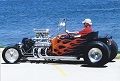
- Full Blown BucketHead
- Posts: 1051
- Joined: Mon Jul 09, 2012 2:36 pm
- Handle: Lee in KC
Re: Electric shifter
Kerry, the forum program didn't recognize your link as an image and couldn't process it. I was able to change the link to a url, and could click on it to open your image.
Posting an image on the forum is actually pretty easy when you use an image hosting site. Just copy the link to your image from the hosting site, then come here to the reply or post topic window and click the "img" button at the top margin of the post window. You will see [ i m g ][ / i m g ] (without the spaces) appear in your post with the cursor flashing in between the ]|[. Just paste the image url from your clipboard by either right-clicking and selecting "paste" or pressing ctrl+v on the keyboard. The url you put in there has to be an image file that the forum software can recognize as an image. If you use your image hosting site's link feature, it should be the right format.
I have a slow day at work tomorrow. I will try to do a step-by-step "how-to" procedure with screen shots and make it a sticky. People will do a face-palm when they realize how easy it is!!!
Posting an image on the forum is actually pretty easy when you use an image hosting site. Just copy the link to your image from the hosting site, then come here to the reply or post topic window and click the "img" button at the top margin of the post window. You will see [ i m g ][ / i m g ] (without the spaces) appear in your post with the cursor flashing in between the ]|[. Just paste the image url from your clipboard by either right-clicking and selecting "paste" or pressing ctrl+v on the keyboard. The url you put in there has to be an image file that the forum software can recognize as an image. If you use your image hosting site's link feature, it should be the right format.
I have a slow day at work tomorrow. I will try to do a step-by-step "how-to" procedure with screen shots and make it a sticky. People will do a face-palm when they realize how easy it is!!!
T-buckets make people smile.
-
Bob Lemke
- Full Blown BucketHead
- Posts: 777
- Joined: Tue Jul 10, 2012 10:59 am
- Handle: deckofficer
- Location: Northern & Southern California
- Contact:
Re: Electric shifter
test
It was not possible to determine the dimensions of the image.
This is what the forum tells me when I use the forum's "Img" button on Kerry's picture from is off site source.
This is what happens when I use PhotoBucket's direct link and bracket it with this forum's "Img" buttom, so it appears his off site source is leaving something out.
It was not possible to determine the dimensions of the image.
This is what the forum tells me when I use the forum's "Img" button on Kerry's picture from is off site source.
This is what happens when I use PhotoBucket's direct link and bracket it with this forum's "Img" buttom, so it appears his off site source is leaving something out.
Bob
-
Lee in KC
- Full Blown BucketHead
- Posts: 1051
- Joined: Mon Jul 09, 2012 2:36 pm
- Handle: Lee in KC
-
Lee in KC
- Full Blown BucketHead
- Posts: 1051
- Joined: Mon Jul 09, 2012 2:36 pm
- Handle: Lee in KC
Re: Electric shifter
https://picasaweb.google.com/lh/photo/t ... directlink
This looks like the url from his browser address bar, which would be different than the outside link to the pic. Notice the httpS.
This looks like the url from his browser address bar, which would be different than the outside link to the pic. Notice the httpS.
T-buckets make people smile.
-
potvinguy
- Baby BucketHead
- Posts: 7
- Joined: Sun Jan 27, 2013 6:57 pm
- Handle: PG
Re: Electric shifter
I think this word doc is attached. Let me know if it is not. And of course any questions are welcome.
- Attachments
-
- Electric Shifter.docx
- (210.38 KiB) Downloaded 44 times
-
mike wade

- Full Blown BucketHead
- Posts: 5047
- Joined: Fri Jul 06, 2012 7:52 pm
- Handle: lincolnut
Re: Electric shifter
potvinguy, In case some one can not open the word doc you attached I have made it into a PDF so anyone should be able to open it. I hope this is Ok with you?
Mike
Mike
TODAY IS THE OLDEST YOU'VE EVER BEEN, YET THE YOUNGEST YOU'LL EVER BE, SO ENJOY THIS DAY WHILE IT LASTS
-
potvinguy
- Baby BucketHead
- Posts: 7
- Joined: Sun Jan 27, 2013 6:57 pm
- Handle: PG
Re: Electric shifter
Sure, thanks, Mike.